





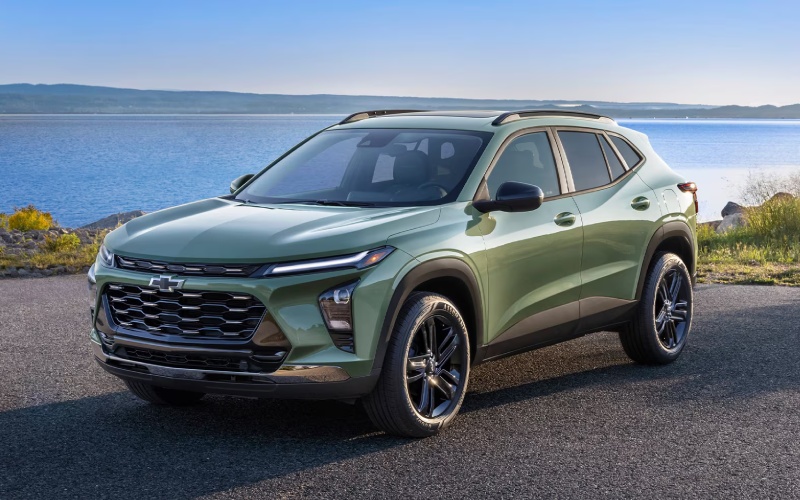
Bob Boyte Chevrolet – How the 2026 Chevrolet Trax Wireless Connectivity and 11-inch Screen Simplify Commuting around Mobile, AL
Wireless connectivity has become the difference between a car that just “has” technology and one that makes your day measurably easier. In the 2026 Trax, standard wireless Apple CarPlay and wireless Android Auto meet an available 11-inch center HD touch-screen, creating a clean, cable-free cabin that helps you start, navigate, and get on with your day with fewer taps and less clutter. It’s the kind of execution that feels natural immediately—smartphone familiarity paired with an interface that’s built for the road.
The Value of Going Fully Wireless
A wireless setup changes small daily habits in a big way. Morning departure means you set your phone on the console, see your apps appear, and go. No hunting for a cable, no flipping connectors, and fewer distractions. The 11-inch screen, when equipped, presents large, easy-to-read tiles and smooth transitions so your most-used apps are one quick touch or voice prompt away. The result is a cabin that stays tidy and a drive that feels intentionally streamlined.
Voice control matters here too. Whether you use Siri or Google Assistant, the Trax’s microphone pickup and simplified prompts help you handle texts, calls, playlists, or quick search queries without taking your hands off the wheel. For commuters who blend back-to-back calls with turn-by-turn directions, that kind of execution is the difference between tech that works and tech you work around.
How Wireless Apple CarPlay and Android Auto Fit Real Life
Pairing is straightforward. Once you’ve connected the first time, your phone will auto-reconnect when you start the Trax. Maps appear where you expect, audio resumes at the right volume, and recent destinations remain easy to find. If you prefer native functions, Trax’s system provides fast access to vehicle settings, audio sources, and camera views, while your phone apps live one tap away.
Navigation is more versatile when you can start on your phone and finish in the vehicle. Drop a pin while you’re at lunch, then hop in the Trax and see that destination pop up—no retyping street names while you’re parked and trying to remember the exact spot. When equipped, the larger 11-inch display brings extra clarity to split-screen layouts, with a map on one side and a media card or call info on the other.
Why the 11-inch Screen Feels Like a Smart Upgrade
The 11-inch center HD touch-screen is more than a size bump; it’s a quality-of-life upgrade that reduces friction. Readability improves, swipes feel smoother, and icons are easier to hit without hunting. If you jump between apps often—maps to music to messages—the larger canvas helps you stay organized. On busy days around I-10 and the Bankhead Tunnel, faster recognition and larger touch targets matter because every glance should be short and productive.
Audio is also easy to personalize. If you like curated playlists, podcasts on the commute, and local stations for news or sports, the expanded interface helps you switch with minimal effort. The sound profile is easy to adjust, and the layout respects how drivers actually use in-car audio: quickly, and often while thinking about the next turn or incoming call.
Wireless Charging and Hotspot: The Finishing Touches
Available wireless charging neatly completes the loop, keeping your phone powered while the cable stays in your bag. Add the available built-in Wi-Fi hotspot, and everyone on board can stream, check email, or collaborate on the go. It’s a small SUV that behaves like a rolling hub, keeping your essentials online without turning the center console into a jumble of cords.
For families, this matters on school runs and weekend drives to the park. For professionals, it’s how you stay responsive between appointments without juggling devices. For students, it turns the Trax into a mobile study break—quickly review a document or download a file while parked before your next class or shift.
Safety and Screen Synergy
Standard Chevy Safety Assist supports you while the screen supports your flow. Features like Forward Collision Alert and Automatic Emergency Braking, Front Pedestrian Braking, Lane Keep Assist with Lane Departure Warning, Following Distance Indicator, and IntelliBeam High Beam Assist help you stay confident on crowded corridors. The interface complements those systems by keeping key settings and status messages visible without overwhelming the display.
Because Trax’s tech works as a system, you aren’t wrestling with layers of menus or toggling modes for every task. You pair once, set preferences, and get used to a predictable rhythm where navigation, audio, and calls live on the big display and safety features run quietly in the background.
Trims and What to Consider
Connectivity is standard across the lineup, so wireless phone mirroring comes with every 2026 Trax. If you want the largest screen experience, look at trims where the 11-inch center HD touch-screen is available—popular choices include LT, 2RS, and ACTIV. Style preferences can guide you too: 2RS brings a race-inspired flat-bottom steering wheel and bold RS accents, while ACTIV leans into Titanium chrome highlights and blackout wheels. The nice part is that your core tech foundation remains consistent, so you’re choosing the way you want your SUV to look and feel without sacrificing the features that simplify daily driving.
If you value precise lane guidance in unfamiliar neighborhoods, a larger map tile on the 11-inch display can reduce missed turns. If you take a lot of calls, the added space for call cards and contact information keeps the interface from feeling cramped. Most drivers will notice the benefit the first time they try a split view—directions on the left, track info on the right—and realize it saves them from hopping between screens at every intersection.
Frequently Asked Questions:
Do I need a specific cable to use Apple CarPlay or Android Auto in the Trax?
No—both are wireless as standard in the 2026 Trax. You can still connect a cable to charge if you prefer, but phone mirroring does not require one.
Does the Wi-Fi hotspot use my phone’s data?
No—the available built-in Wi-Fi hotspot uses its own data plan. You can connect multiple devices and manage settings from the infotainment system.
Is wireless charging included?
Wireless charging is available. If equipped, simply place a compatible device on the pad to top off the battery during your drive.
Will the system remember my phone after the first pairing?
Yes. After initial setup, it will reconnect automatically when you start the vehicle, so your apps and preferences load right away.
When technology is this cohesive, it frees you to pay attention to the drive, not the setup. That is why the 2026 Trax’s wireless connectivity and available 11-inch screen feel significant—because they work the way you already live. If you want help choosing the trim that best matches your tech preferences, Bob Boyte Chevrolet can walk you through feature availability and set up a hands-on demo so you can see the interface in action.
We’re proudly serving Mobile, Hattiesburg, and Lucedale with a compact SUV that feels easy to use from the first mile. Step in, set your phone down, and watch the system do the rest. The 2026 Trax’s approach to connectivity is refreshingly simple: less fiddling, more driving—and a cabin that stays clean and focused no matter how busy your day gets.
Request more 2026 Chevrolet Trax information
Connect with us

