




Blog / Chevrolet Trax

Why the 2026 Chevrolet Trax LT Fits Everyday Driving around Laurel, MS

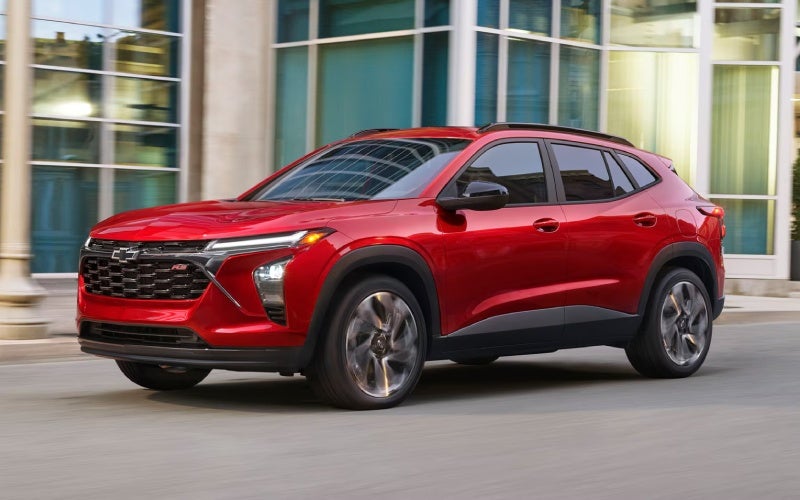
2026chevrolettrax-exterior-01
Why the 2026 Chevrolet Trax LT Fits Everyday Driving around Laurel, MS

Bob Boyte Chevrolet - Why the 2026 Chevrolet Trax LT Fits Everyday Driving around Laurel, MS

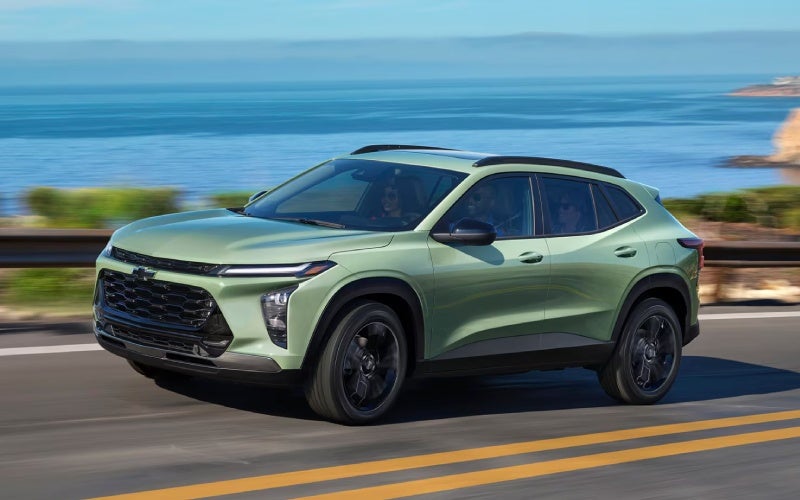
The 2026 Chevrolet Trax LT makes a strong case for shoppers around Laurel, MS who want a small SUV that feels modern, useful, and easy to live with every day. Laurel has a mix of local streets, school traffic, retail areas, rural connectors, and highway stretches, so a vehicle needs to be more than stylish. It should be simple to park downtown, relaxed on longer drives, efficient in daily use, and flexible enough for errands, family needs, and spontaneous plans. That is where the Trax LT stands out. It keeps the approachable size that makes Trax so appealing, then adds key comfort and technology features that make daily driving feel more refined.

For shoppers comparing trims, the LT hits a sweet spot. It adds the 11-inch diagonal color touch-screen and 8-inch diagonal color Driver Information Center, giving the cabin a more advanced layout without overcomplicating the experience. It also includes a remote vehicle starter system and automatic climate controls, two features that quickly become part of a driver’s daily rhythm. Bob Boyte Chevrolet, serving Hattiesburg, Lucedale, and Laurel, can help online shoppers see why the LT is such a practical upgrade for drivers who want the right mix of convenience, safety, cargo versatility, and technology.

A Smart Size for Laurel, MS Driving

The Trax LT is compact enough to feel easy in town, but it does not feel limited once you get inside. That balance matters around Laurel, where a typical day may include work, school pickups, a stop near the historic downtown area, a grocery run, and a drive out toward surrounding communities. The Trax is easy to maneuver in parking lots and narrow spaces, yet its cabin offers seating for five and enough room for most adults to ride comfortably.

The 60/40 split-folding rear seat adds real flexibility. If you need to carry luggage, tools, sports equipment, small furniture, or supplies for a weekend project, the rear area can adapt without turning the vehicle into something bulky. With up to 54 cu. ft. of max cargo space, the Trax LT works well for drivers who want SUV practicality but do not need a larger, heavier vehicle. It is a sensible size for daily life, and that is one of the main reasons this trim feels so easy to recommend.

Why the LT Interior Feels Like the Right Upgrade

The LT trim’s cabin technology is one of its biggest advantages. The 11-inch diagonal color touch-screen gives the front cabin a clean, confident focal point, while the 8-inch diagonal color Driver Information Center helps keep important vehicle information directly in front of the driver. That combination feels especially useful on familiar routes, where quick access to navigation, music, calls, and vehicle data can make the drive smoother without becoming distracting.

Wireless Apple CarPlay® and wireless Android Auto™ compatibility are also important because modern drivers rely on phones for so much of the daily drive. Whether using maps to check traffic, listening to a favorite playlist, or staying connected to family, the Trax LT supports those needs without extra cords cluttering the cabin. Available wireless charging and a built-in Wi-Fi® hotspot add even more convenience for drivers and passengers who depend on connected devices throughout the day.

Comfort Features That Matter Every Day

The remote vehicle starter system and automatic climate controls are not just nice additions. They make the Trax LT feel more convenient before and during the drive. A remote start system can help the cabin begin settling into a comfortable setting before the driver gets in, while automatic climate controls simplify adjustments once underway. Instead of constantly changing settings, the driver can focus more attention on the road and the route ahead.

This is especially helpful for households with multiple drivers or busy schedules. If the Trax LT is being used for commuting, appointments, child transportation, errands, and evening activities, the cabin needs to be easy for anyone to settle into. The LT does that well. It feels straightforward, organized, and modern. It does not overwhelm with complexity, yet it offers the kind of convenience features many shoppers expect in a new small SUV.

Safety Confidence Comes Standard

Every 2026 Chevrolet Trax includes standard Chevy Safety Assist, and that is a major reason the LT is such a strong everyday choice. This suite includes Forward Collision Alert, Automatic Emergency Braking, Front Pedestrian Braking, Lane Keep Assist with Lane Departure Warning, Following Distance Indicator, and IntelliBeam® High Beam Assist. These features are designed to support driver awareness in common situations, from changing traffic speeds to lane position and pedestrian activity.

For Laurel drivers, that support can be valuable across a wide range of settings. Local roads may involve frequent turns, stop-and-go traffic, pedestrians near businesses or schools, and longer stretches where fatigue can set in. Safety and driver assistance features do not replace attentive driving, but they can add helpful support to daily travel. The Trax LT makes this confidence part of the standard experience, which strengthens its overall appeal.

What Makes the LT Different from Other Trax Trims?

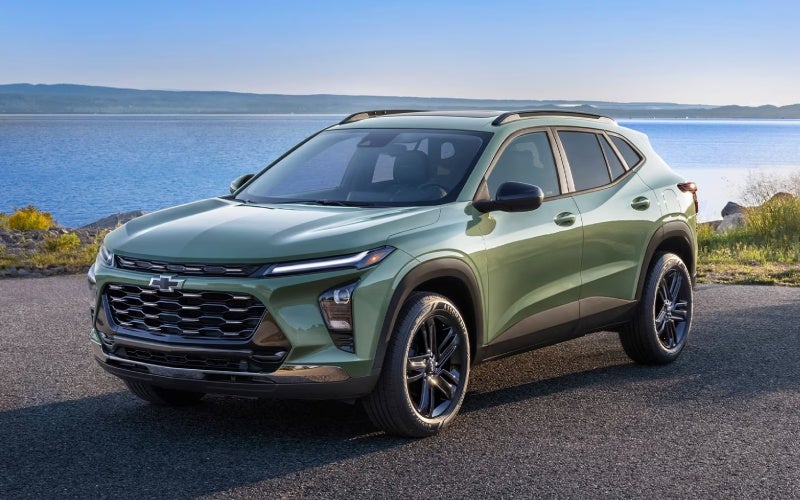
The LS is a smart starting point, and the RS trims bring sportier design. The ACTIV adds its own bold personality with Black-painted wheels, Titanium chrome accents, and ACTIV badging. The LT, however, focuses on broad daily usefulness. It gives shoppers the larger screen setup, automatic climate controls, remote vehicle starter system, and a polished exterior look with 17-inch machined two-tone wheels. It is not the flashiest Trax, but it may be the most naturally suited to a wide range of drivers.

  • Technology: The LT adds the 11-inch diagonal color touch-screen and 8-inch diagonal color Driver Information Center.
  • Convenience: The remote vehicle starter system supports smoother daily routines.
  • Comfort: Automatic climate controls help simplify cabin temperature management.
  • Versatility: The 60/40 split-folding rear seat supports cargo and passenger needs.
  • Confidence: Standard Chevy Safety Assist gives every drive a stronger foundation.

Who Should Choose the 2026 Chevrolet Trax LT?

The Trax LT is a smart pick for drivers who want practical transportation that still feels current. It is well suited for commuters who value connectivity, parents who need flexible space, first-time SUV buyers who want confidence without excess size, and downsizers who still want modern technology. It also works well for shoppers who like the Trax’s design but prefer a trim that prioritizes comfort and usability over a sport-themed or appearance-focused package.

Another advantage is how naturally the LT fits into a single-vehicle household. It can handle weekday responsibilities, longer drives, shopping trips, and casual travel without asking the driver to compromise much. Its size helps in town, its cargo space helps with real life, and its display technology helps the cabin feel up to date. The LT is the kind of trim that makes sense on the test drive and continues making sense after months of ownership.

Frequently Asked Questions:

Does the 2026 Chevrolet Trax LT have wireless smartphone compatibility?

Yes. The 2026 Chevrolet Trax offers wireless Apple CarPlay® and wireless Android Auto™ compatibility, helping drivers access compatible phone features without relying on a cord.

How much cargo space does the Trax offer?

The 2026 Chevrolet Trax offers up to 54 cu. ft. of max cargo space when properly configured, and the 60/40 split-folding rear seat helps drivers adapt the cabin for passengers or gear.

Why choose the LT instead of the LS?

The LT is a strong upgrade because it adds the larger display setup, remote vehicle starter system, automatic climate controls, and 17-inch machined two-tone wheels while keeping the practical Trax footprint.

Is the Trax LT a good choice for daily driving around Laurel, MS?

Yes. Its compact size, flexible interior, standard Chevy Safety Assist, and modern cabin technology make it well suited for local errands, commutes, school routines, and regional travel.

The Bottom Line on the Trax LT

The 2026 Chevrolet Trax LT stands out because it understands what many small SUV shoppers actually need. It is easy to drive, easy to park, comfortable to use, and equipped with the technology that makes daily life simpler. It does not rely on one standout feature alone. Instead, it brings together space, safety, convenience, and connectivity in a way that feels balanced and practical.

For drivers around Laurel, MS, that balance is exactly the point. The Trax LT can move through a busy weekday, support a family schedule, and still feel relaxed when the drive opens up beyond town. If you want a small SUV with useful upgrades and a cabin that feels ready for modern routines, the 2026 Chevrolet Trax LT should be high on your list.

*Image may not be actual model
Request more 2026 Chevrolet Trax information

Posted in:

Related Posts

2026chevrolettrax-exterior-02

Parking Made Simple and Tech That Clicks — 2026 Chevrolet Trax Insights for Slidell, LA

Bob Boyte Chevrolet - Parking Made Simple and Tech That Clicks — 2026 Chevrolet Trax Insights for Slidell, LA The 2026 Chevrolet Trax packs the kind of smart design and modern connectivity that feels tailor-made for Slidell. Small on the outside and seriously clever on the inside, it’s perfect for slipping into tight spots around Olde Towne or Fremaux Town Center while keeping passengers comfortable and your tech fully in sync. If you’re mapping daily drives across I-10 or swinging over the Twin Span Bridge, this compact SUV meets you with confident manners, crisp visibility, and the driver-assistance essentials you want watching your back. What Stands Out Day One Standard wireless Apple CarPlay® and wireless Android Auto™ are worth highlighting immediately. The Trax lets you leave cords behind, keeping your console tidy and your focus on the drive. The available 11-inch center HD touch-screen pairs clean visuals with simple menus, so navigation, playlists, and calls are never a chore. Add the available wireless charging pad and built-in Wi-Fi® hotspot, and your cabin becomes a calm, always-ready command center for commuting, school runs, or a weekend loop along the lake. The second thing you notice is space — especially how easily the rear seats fold to open up cargo. With up to 54 cubic feet of room and a 60/40 split-fold design, you can handle errands, sports bags, or a big grocery run without juggling. The rear seating area accommodates adults more comfortably than you might expect from a compact footprint, which is helpful when you’re carpooling or heading out for dinner near Pontchartrain Drive. Confidence You Can Feel Every Trax comes equipped with Chevy Safety Assist, a bundle of features that help look out for collisions, lane drift, and alerts that keep you informed in the flow of traffic. Forward Collision Alert and Automatic Emergency Braking can assist when a sudden slowdown happens ahead; Front Pedestrian Braking reinforces confidence in busy shopping zones; Lane Keep Assist with Lane Departure Warning gently cues you to stay centered on the causeway. IntelliBeam® High Beam Assist takes one more task off your hands during nighttime drives. For drivers who want even more support, available features like Lane Change Alert with Side Blind Zone Alert and Rear Cross Traffic Alert add situational awareness in crowded parking lots. Available Rear Park Assist helps you reverse into tight curbside spaces with added clarity. The Trax never feels overbearing; it simply helps you stay focused and informed with alerts that make sense. Trim Insights to Make Choosing Easier Not sure which Trax fits your style? The lineup offers distinct personalities. LS keeps it simple and smart with the essentials and standard safety tech. 1RS adds sporty cues like eye-catching 18-inch machined two-tone wheels and RS badging. LT is your value-rich step-up with the available 11-inch screen, an 8-inch Driver Information Center, Remote vehicle starter system, and Automatic climate controls. If you want bolder design, 2RS ups the presence further with 19-inch machined two-tone wheels and striking Black bowtie emblems, while ACTIV leans into a confident, outdoors-ready look with 18-inch Black-painted aluminum wheels and Titanium chrome grille accents. Inside, touches like a flat-bottom steering wheel on 2RS bring a sportier vibe, while Active Noise Cancellation across the range keeps conversation easy. You’ll find a cabin that feels upscale in its simplicity — clear controls, smart storage, and an overall sense that everything is where it should be. Everyday Practicality Around Slidell The Trax’s compact size helps with street parking near dining spots and local events, and the lighter, front-wheel-drive setup feels nimble in traffic. Visibility is crisp, and the ride is composed, so you won’t mind a longer stint on I-12 or I-59 when plans take you farther afield. When errands stack up, the 60/40 rear seat split lets you balance passengers with gear quickly — and when the seats are down, the load space is big enough to handle a week’s worth of projects without fuss. Those thoughtful touches keep showing up. Need a quick start on a hot day? Trims like LT and above offer a Remote vehicle starter system and Automatic climate controls to pre-condition your cabin. Rely on your phone for navigation and podcasts? Standard wireless Apple CarPlay® and wireless Android Auto™ keep everything front and center with no cables, and the available wireless charging pad recharges while you roll. Feature Highlights You’ll Appreciate Wireless smartphone integration: Cord-free Apple CarPlay® and Android Auto™ Available 11-inch display: Clean visuals, helpful layout Chevy Safety Assist: Standard advanced driver assistance Roomy rear space: Adult-friendly seating and easy-fold versatility Calm cabin: Active Noise Cancellation as standard Distinct styles: RS and ACTIV designs with unique details Shoppers often ask how the Trax compares with other small SUVs. In practice, it’s the sum of the details that sets it apart — standard active safety across the board, genuinely useful screen tech, and a back seat plus cargo area that handle everyday life without compromise. You don’t need to overthink options just to get the core features you want. Frequently Asked Questions: Does every 2026 Trax include advanced safety features? Yes. Chevy Safety Assist is standard on all trims, giving you key driver-assistance features without requiring a package upgrade. Which Trax trims offer the larger touch-screen? The available 11-inch center HD touch-screen is offered on select trims like LT and above. Ask our team to show you which configurations include it. How flexible is the cargo area for everyday tasks? Very. With the 60/40 split-fold rear seats and up to 54 cubic feet of max cargo space, you can quickly adapt for errands, outings, or small projects. When you’re ready to see how it fits your life in Slidell, take the Trax for a drive that mirrors your daily routine — quick turns, a few stops, and a stretch on the highway. You’ll feel how the tech, space, and safety come together in a way that’s refreshingly straightforward. We’re proud to be part of a Gulf Coast community that asks smart questions and values practical solutions. At Bob Boyte Chevrolet, we match that energy with helpful guidance, test drives on your terms, and a streamlined path from research to keys. You’ll find our team serving Gulfport, Slidell, and Moss Point with clear answers and thoughtful recommendations that make choosing your Trax easier. Request more 2026 Chevrolet Trax information

Which small SUV makes everyday life easier for Gulfport, MS drivers — the 2026 Chevrolet Trax or the 2026 Hyundai KONA?

Which small SUV makes everyday life easier for Gulfport, MS drivers — the 2026 Chevrolet Trax or the 2026 Hyundai KONA?

Bob Boyte Chevrolet - Which small SUV makes everyday life easier for Gulfport, MS drivers — the 2026 Chevrolet Trax or the 2026 Hyundai KONA? What local drivers mean by "easier"—and why it matters When shoppers ask us which small SUV makes everyday life easier around Gulfport, MS—the 2026 Chevrolet Trax or the 2026 Hyundai KONA—we look beyond spec sheets to the moments that define coastal commutes. That’s the quick merge onto Highway 49 after a midweek Costco stop, parallel spots near the beach on busy weekends, and the everyday tap-tap rhythm of traffic lights on Pass Road. In that context, "easier" means tech that’s intuitive the first time you touch it, safety that’s standard and confidence-boosting, and cargo flexibility that doesn’t require a how-to video. Both SUVs have strengths, but the Trax lines them up in a tidy, ready-from-the-start package that wins over a lot of Gulf Coast drivers. Start with core tech. The Trax brings wireless Apple CarPlay® and Android Auto™ standard, and the available 11-inch center HD touch-screen keeps maps and media obvious and finger-friendly. The interface is clean, menus are predictable, and physical controls sit where your hand expects them. The KONA offers a sleek digital display and wireless smartphone integration, too, but many of its most attention-getting features appear on top trims. If your goal is to avoid option-chasing and still feel like your SUV is modern and connected on day one, the Trax checks the box with less complexity. Add the available built-in Wi-Fi® hotspot and available wireless charging, and your passengers can keep devices humming while you keep your focus on the drive. Everyday usability: the stuff you feel at 10 mph and 70 mph On the move, the Trax’s ECOTEC® 1.2L Turbo engine emphasizes smooth, low-end torque—perfect for those quick gaps between lights on Cowan Road or a confident roll-on toward I-10 ramps. It isn’t trying to be a hot hatch; it’s tuned to feel composed and ready, which takes the edge off busy stretches. Meanwhile, standard Chevy Safety Assist adds peace of mind with Forward Collision Alert, Automatic Emergency Braking, Front Pedestrian Braking, Lane Keep Assist with Lane Departure Warning, Following Distance Indicator, and IntelliBeam® High Beam Assist. KONA offers a robust Hyundai SmartSense suite as well, and high trims stack on impressive aids like Highway Driving Assist and Blind-Spot View Monitor. Those are excellent technologies—but if you’re after a strong base of driver assistance without climbing the trim ladder, Trax has the advantage. Practicality is about loading and going without overthinking it. The Trax’s 60/40 split-folding rear seat and up to 54 cu. ft. of max cargo space make it easy to run impromptu errands. The load floor’s shape and height feel friendly when you’re managing beach gear, coolers, or a week’s groceries. KONA is flexible, too, and can be configured for more premium touches, but the Trax’s straightforward packaging and clear cargo area make it the one that feels "ready now" for a wide range of daily tasks. Who should consider KONA? Drivers who want available HTRAC AWD for added traction feel or who value certain Limited-trim features like Surround View Monitor or Blind-Spot View Monitor may lean toward KONA. It also presents a bold design take with a panoramic-feeling display panel and upscale equipment at the top end. If those specifics are your priorities, KONA deserves a close look. Who should consider Trax? If your list starts with intuitive tech on day one, standard safety across the board, tidy parking manners, and a cabin that somehow feels bigger than it looks, Trax is likely the better fit. Its trims like RS and ACTIV also give you distinct personalities without sending you on a feature scavenger hunt. For many Gulfport-area shoppers, that balance of style, simplicity, and smart packaging is the difference they feel after a few blocks. Three takeaways to help your decision Core safety coverage: Chevy Safety Assist is standard across Trax, delivering collision alerts, automatic braking, lane support, and IntelliBeam®. Tech that’s ready: Wireless Apple CarPlay®/Android Auto™, available 11-inch center HD touch-screen, available Wi-Fi® hotspot, and available wireless charging keep drives connected and simple. Practical space: 60/40 split-folding seats and a well-shaped cargo area make quick work of errands, beach days, and weekend projects. Frequently Asked Questions: Does the Trax have the smartphone features I use every day? Yes. Wireless Apple CarPlay® and Android Auto™ are standard, so you can run navigation, calls, and playlists without a cable. An available 11-inch center HD touch-screen and available wireless charging complete the everyday tech trio. Is driver-assistance tech standard on the Trax? Chevy Safety Assist is standard and includes Forward Collision Alert, Automatic Emergency Braking, Front Pedestrian Braking, Lane Keep Assist with Lane Departure Warning, Following Distance Indicator, and IntelliBeam® High Beam Assist. What if I want advanced parking or highway aids? Trax offers helpful available assists like Lane Change Alert with Side Blind Zone Alert and Rear Cross Traffic Alert. If you want features like Highway Driving Assist or Surround View Monitor, those are offered on higher KONA trims—worth considering if that specific tech tops your list. Which feels easier to live with day to day? For many Gulf Coast drivers, Trax’s mix of standard safety, intuitive infotainment, and cargo-friendly design makes it easier to live with from day one. KONA’s high-trim tech is impressive, but Trax’s balance of features across the lineup tends to win for everyday simplicity. Next steps for Gulf Coast shoppers Still deciding? A back-to-back drive will answer more in ten minutes than a week of scrolling. Schedule time to pair your phone, try a few parking maneuvers, fold the seats, and load items you actually carry. That hands-on approach makes the right choice obvious. Bob Boyte Chevrolet—serving Gulfport, Slidell, and Moss Point—can set up a focused test-drive loop and walk you through trims like RS and ACTIV, so you leave confident you picked the small SUV that makes everyday life easier. Request more 2026 Chevrolet Trax information

How the 2026 Chevrolet Trax Wireless Connectivity and 11-inch Screen Simplify Commuting around Mobile, AL

How the 2026 Chevrolet Trax Wireless Connectivity and 11-inch Screen Simplify Commuting around Mobile, AL

Bob Boyte Chevrolet - How the 2026 Chevrolet Trax Wireless Connectivity and 11-inch Screen Simplify Commuting around Mobile, AL Wireless connectivity has become the difference between a car that just “has” technology and one that makes your day measurably easier. In the 2026 Trax, standard wireless Apple CarPlay and wireless Android Auto meet an available 11-inch center HD touch-screen, creating a clean, cable-free cabin that helps you start, navigate, and get on with your day with fewer taps and less clutter. It’s the kind of execution that feels natural immediately—smartphone familiarity paired with an interface that’s built for the road. The Value of Going Fully Wireless A wireless setup changes small daily habits in a big way. Morning departure means you set your phone on the console, see your apps appear, and go. No hunting for a cable, no flipping connectors, and fewer distractions. The 11-inch screen, when equipped, presents large, easy-to-read tiles and smooth transitions so your most-used apps are one quick touch or voice prompt away. The result is a cabin that stays tidy and a drive that feels intentionally streamlined. Voice control matters here too. Whether you use Siri or Google Assistant, the Trax’s microphone pickup and simplified prompts help you handle texts, calls, playlists, or quick search queries without taking your hands off the wheel. For commuters who blend back-to-back calls with turn-by-turn directions, that kind of execution is the difference between tech that works and tech you work around. How Wireless Apple CarPlay and Android Auto Fit Real Life Pairing is straightforward. Once you’ve connected the first time, your phone will auto-reconnect when you start the Trax. Maps appear where you expect, audio resumes at the right volume, and recent destinations remain easy to find. If you prefer native functions, Trax’s system provides fast access to vehicle settings, audio sources, and camera views, while your phone apps live one tap away. Navigation is more versatile when you can start on your phone and finish in the vehicle. Drop a pin while you’re at lunch, then hop in the Trax and see that destination pop up—no retyping street names while you’re parked and trying to remember the exact spot. When equipped, the larger 11-inch display brings extra clarity to split-screen layouts, with a map on one side and a media card or call info on the other. Why the 11-inch Screen Feels Like a Smart Upgrade The 11-inch center HD touch-screen is more than a size bump; it’s a quality-of-life upgrade that reduces friction. Readability improves, swipes feel smoother, and icons are easier to hit without hunting. If you jump between apps often—maps to music to messages—the larger canvas helps you stay organized. On busy days around I-10 and the Bankhead Tunnel, faster recognition and larger touch targets matter because every glance should be short and productive. Audio is also easy to personalize. If you like curated playlists, podcasts on the commute, and local stations for news or sports, the expanded interface helps you switch with minimal effort. The sound profile is easy to adjust, and the layout respects how drivers actually use in-car audio: quickly, and often while thinking about the next turn or incoming call. Wireless Charging and Hotspot: The Finishing Touches Available wireless charging neatly completes the loop, keeping your phone powered while the cable stays in your bag. Add the available built-in Wi-Fi hotspot, and everyone on board can stream, check email, or collaborate on the go. It’s a small SUV that behaves like a rolling hub, keeping your essentials online without turning the center console into a jumble of cords. For families, this matters on school runs and weekend drives to the park. For professionals, it’s how you stay responsive between appointments without juggling devices. For students, it turns the Trax into a mobile study break—quickly review a document or download a file while parked before your next class or shift. Safety and Screen Synergy Standard Chevy Safety Assist supports you while the screen supports your flow. Features like Forward Collision Alert and Automatic Emergency Braking, Front Pedestrian Braking, Lane Keep Assist with Lane Departure Warning, Following Distance Indicator, and IntelliBeam High Beam Assist help you stay confident on crowded corridors. The interface complements those systems by keeping key settings and status messages visible without overwhelming the display. Because Trax’s tech works as a system, you aren’t wrestling with layers of menus or toggling modes for every task. You pair once, set preferences, and get used to a predictable rhythm where navigation, audio, and calls live on the big display and safety features run quietly in the background. Trims and What to Consider Connectivity is standard across the lineup, so wireless phone mirroring comes with every 2026 Trax. If you want the largest screen experience, look at trims where the 11-inch center HD touch-screen is available—popular choices include LT, 2RS, and ACTIV. Style preferences can guide you too: 2RS brings a race-inspired flat-bottom steering wheel and bold RS accents, while ACTIV leans into Titanium chrome highlights and blackout wheels. The nice part is that your core tech foundation remains consistent, so you’re choosing the way you want your SUV to look and feel without sacrificing the features that simplify daily driving. If you value precise lane guidance in unfamiliar neighborhoods, a larger map tile on the 11-inch display can reduce missed turns. If you take a lot of calls, the added space for call cards and contact information keeps the interface from feeling cramped. Most drivers will notice the benefit the first time they try a split view—directions on the left, track info on the right—and realize it saves them from hopping between screens at every intersection. Frequently Asked Questions: Do I need a specific cable to use Apple CarPlay or Android Auto in the Trax? No—both are wireless as standard in the 2026 Trax. You can still connect a cable to charge if you prefer, but phone mirroring does not require one. Does the Wi-Fi hotspot use my phone’s data? No—the available built-in Wi-Fi hotspot uses its own data plan. You can connect multiple devices and manage settings from the infotainment system. Is wireless charging included? Wireless charging is available. If equipped, simply place a compatible device on the pad to top off the battery during your drive. Will the system remember my phone after the first pairing? Yes. After initial setup, it will reconnect automatically when you start the vehicle, so your apps and preferences load right away. When technology is this cohesive, it frees you to pay attention to the drive, not the setup. That is why the 2026 Trax’s wireless connectivity and available 11-inch screen feel significant—because they work the way you already live. If you want help choosing the trim that best matches your tech preferences, Bob Boyte Chevrolet can walk you through feature availability and set up a hands-on demo so you can see the interface in action. We’re proudly serving Mobile, Hattiesburg, and Lucedale with a compact SUV that feels easy to use from the first mile. Step in, set your phone down, and watch the system do the rest. The 2026 Trax’s approach to connectivity is refreshingly simple: less fiddling, more driving—and a cabin that stays clean and focused no matter how busy your day gets. Request more 2026 Chevrolet Trax information